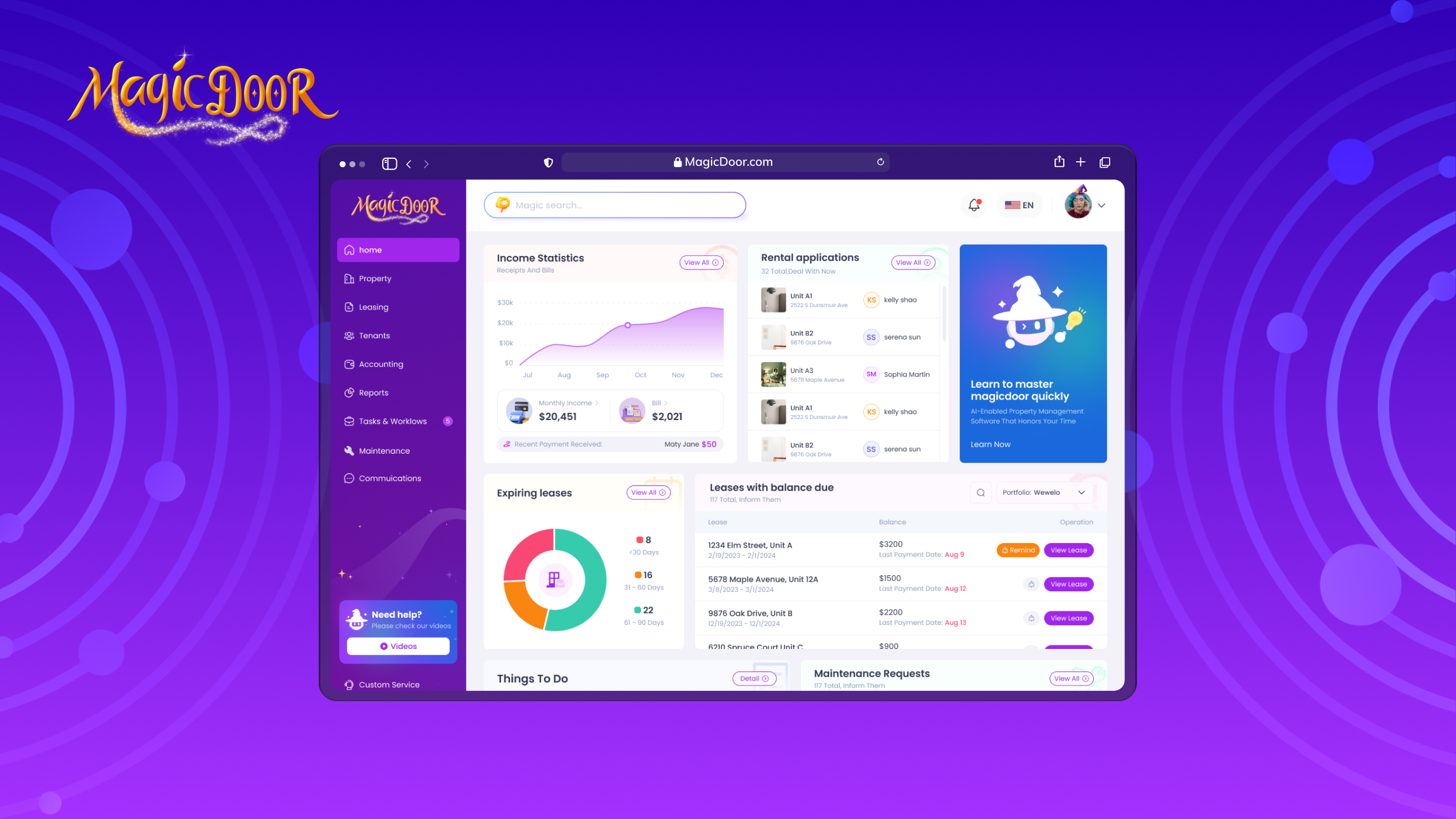
How Property Managers Should Choose Vendor Management Software
Get expert property management insights, straight to your inbox.
Vendor relationships directly affect maintenance speed, cost control, and resident satisfaction. As portfolios grow, spreadsheets and email threads no longer provide the direction that property managers need.
Vendor management software introduces structure into how vendors are onboarded, assigned, monitored, and paid.
Today’s systems go beyond contact storage. They centralize vendor documentation, automate compliance tracking, and create standardized approval workflows for work orders and invoices. This improves governance, increases staff productivity, and reduces the likelihood of insurance gaps or payment errors.
Choosing the right platform means selecting software that aligns with your portfolio size, integrates with accounting and maintenance systems, and supports long-term growth without increasing administrative load.
What is Vendor Management Software in Property Management?
Vendor management software is a system that helps property managers organize, monitor, and control their vendor network from one platform.
In property management, vendors handle maintenance, repairs, inspections, cleaning, and other services. A vendor management solution centralizes vendor information, tracks vendor performance, manages vendor contracts, and supports compliance management. Rather than storing documents in email threads or spreadsheets, everything lives inside a structured management system.
At a basic level, vendor management software allows property managers to:
- Store licenses, insurance certificates, and W-9 forms
- Track vendor compliance with regulatory requirements
- Manage vendor payments and invoice approvals
- Monitor performance metrics like response time and cost
- Maintain a searchable history of services and maintenance work
Automation plays a key role. Automated workflows help streamline vendor management processes, reduce human error, and ensure timely vendor payments. Real-time alerts for expiring insurance or missing documentation support risk management and protect against liability.
Many platforms integrate with property management software and accounts payable systems, keeping vendor payments, maintenance requests, and procurement processes connected.
Key Features to Consider in Vendor Management Systems
| Feature | What it does | Why it matters for property managers |
|---|---|---|
| Vendor Onboarding & Credentialing | Collects and stores insurance, licenses, W-9 forms, and vendor contracts | Supports compliance, due diligence, and reduces liability risk |
| Compliance & Expiration Tracking | Sends alerts for expiring insurance or missing documentation | Prevents coverage gaps and protects against regulatory risk |
| Centralized Vendor Database | Stores all vendor information, service history, and documents in one platform | Improves visibility and simplifies vendor management processes |
| Work Order Assignment Rules | Routes maintenance requests by property, service type, or vendor category | Ensures qualified vendors handle the right services |
| Vendor Performance Metrics | Tracks response time, completion speed, cost patterns, and service quality | Provides actionable insights and supports contract management decisions |
| Maintenance History Tracking | Records repair timelines from submission to completion | Strengthens accountability and performance review |
| Invoice Approval Workflows | Matches invoices to approved work orders before payment | Reduces payment errors and improves financial control |
| Accounting System Integration | Syncs vendor payments with property management accounting | Prevents duplicate data entry and strengthens financial accuracy |
| Risk Management Controls | Verifies vendor compliance and maintains approval records | Protects against disputes, non-compliance, and uninsured work |
| Reporting & Spend Analysis | Provides visibility into vendor spend and service frequency | Helps reduce unnecessary costs and improve vendor selection |
Vendor Onboarding With Insurance & License Verification Controls
Vendor onboarding sets the tone for your entire vendor management process. Property managers need a structured way to vet new vendors before assigning them to maintenance requests.
Vendor management software should support digital vendor credentialing, including the collection and tracking of:
- Insurance certificates
- Business licenses
- W-9 forms
- Vendor contracts and service agreements
Automated compliance tracking reduces risk by alerting managers when coverage expires or when documents are missing. This protects against liability issues and supports regulatory compliance. A complete history of approvals and documentation also strengthens due diligence and contract management practices.
Centralizing vendor information inside a single platform improves visibility for procurement teams and ensures third-party vendors meet your business needs before work begins. Strong onboarding controls reduce operational costs by preventing delays, insurance disputes, and unverified service providers from entering your vendor network.
Work Order Assignment Rules by Property & Vendor Type
Not every vendor should receive every job.
Vendor management systems should allow property managers to assign work based on property location, service category, and vendor type. For example, plumbing vendors may handle specific properties, while pest control services are routed to approved specialists.
Assignment rules help:
- Route maintenance requests automatically
- Match key vendors to specific services
- Balance workload across the vendor network
- Track vendor performance by property
Automation within the management system saves time and reduces manual decision-making. It also supports risk management by ensuring only compliant vendors are eligible for assignment.
When vendor management software integrates with other maintenance and accounting software, work order workflows remain structured and traceable. Clear assignment rules strengthen vendor relationships and help align vendor performance with more general business purposes.
Vendor Performance Tracking Through Response & Completion Metrics
Vendor management should be measurable.
Property managers need visibility into how vendors actually perform, not just whether a job was completed. Vendor management software should track response time, completion speed, cost variance, and repeat maintenance issues.
Clear performance metrics allow managers to:
- Compare vendors handling similar services
- Identify slow response patterns
- Monitor maintenance tracking by property
- Review service history before renewing vendor contracts
This data supports risk assessment and strengthens vendor relationships. It also provides actionable insights for procurement teams when deciding which vendors to retain, replace, or renegotiate.
A structured management system that stores rental house repair histories, timestamps, and feedback creates accountability. Over time, performance tracking helps reduce unnecessary costs and ensures that vendors meet service expectations aligned with property management standards.
Invoice Approval Controls With Accounting System Integration
Vendor invoices should follow a clear approval process before payment.
Vendor management software should support automated invoice routing tied to work orders. This means invoices are matched to completed maintenance tasks, reviewed, and approved before they are entered into property management accounting records.
Strong controls typically include:
- Multi-step approval workflows
- Matching invoices to contract terms
- Verification against approved work orders
- Digital records of approvals and edits
Integration with property management software keeps vendor payments aligned with maintenance tracking and financial reporting. This reduces errors, protects against duplicate payments, and strengthens risk management.
When invoice approvals, vendor payments, and accounting are all in one connected system, property managers can manage spending with greater visibility and fewer manual checks.
Factors to Consider When Choosing Vendor Management Software
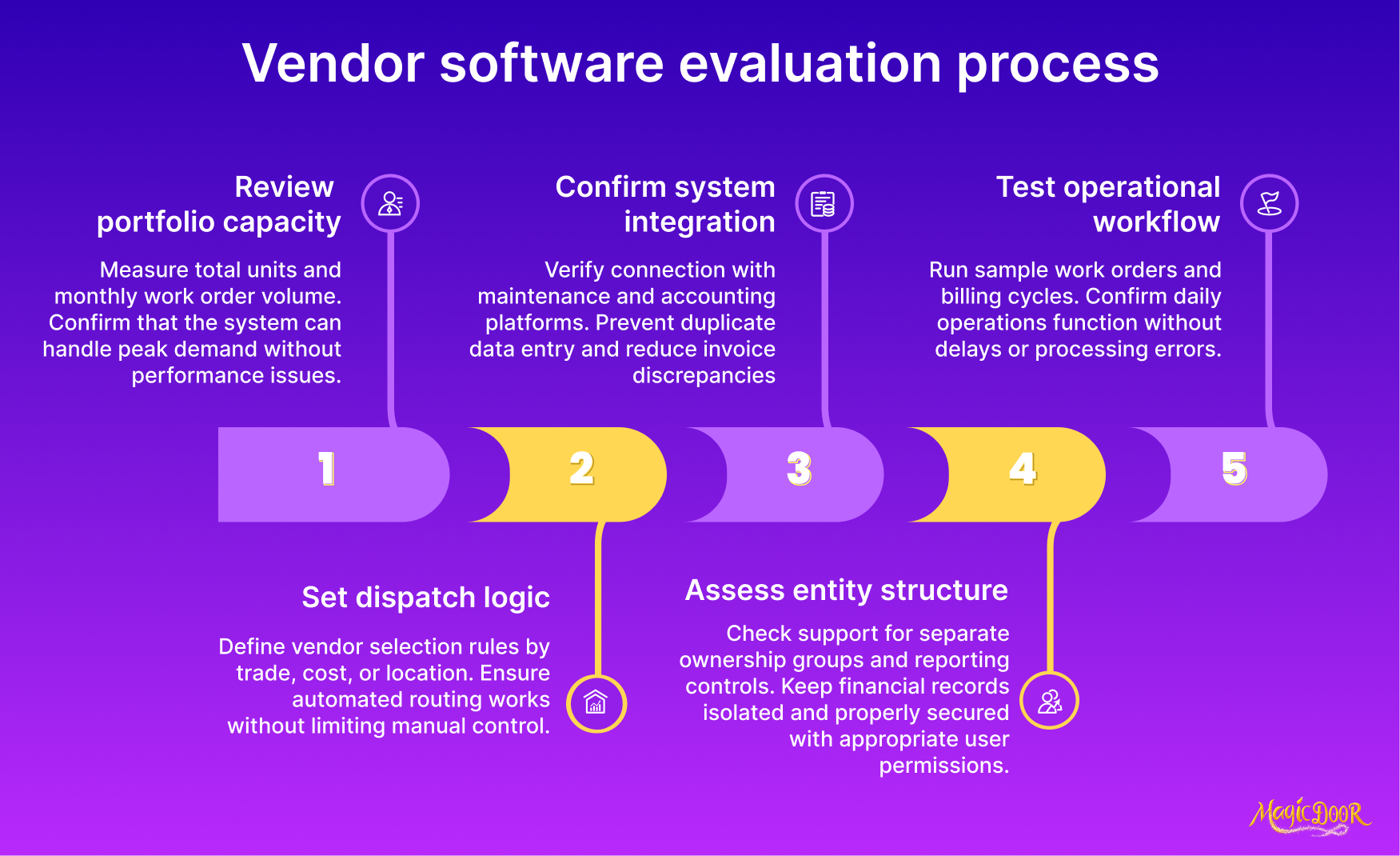
Portfolio Size Compatibility & Work Order Volume Capacity
Vendor management software must be sized to your portfolio and the number of work orders generated each month. A system that handles a small vendor network may struggle once maintenance volume increases and more vendors are added.
Property managers should evaluate whether the management system can:
- Support a growing number of vendors
- Handle higher work order volume without delays
- Maintain a full history of approvals, contracts, and service records
- Scale without requiring a system change
As portfolios grow, manual vendor management processes become harder to control. Software that centralizes vendor information, tracks compliance documents, and stores repair histories reduces administrative pressure and supports accountability.
Capacity planning also affects cost control. A platform that keeps vendor data structured and searchable helps property managers reduce unnecessary spending and avoid duplicated work.
Control Over Vendor Assignment & Dispatch Rules
Vendor assignment should follow clear rules, not ad-hoc decisions.
Vendor management software should allow property managers to control how maintenance requests are routed. This includes setting assignment rules based on service type, property location, or approved vendor status.
Strong dispatch controls help you:
- Route jobs only to compliant vendors
- Match vendors to specific services
- Maintain consistency in vendor relationships
- Track which vendors handle which properties
Structured dispatch rules strengthen risk management by ensuring that only vetted vendors receive work. They also create traceable records for compliance and performance tracking.
When vendor assignment is automated within the system, property managers save time and maintain better visibility into who handled each request, how quickly it was completed, and whether service standards were met.
Integration With Maintenance & Accounting Systems
| With full system integration | Without system integration |
|---|---|
| Work orders sync automatically with accounting records | Staff re-enter work order data manually |
| Vendor invoices attach directly to property files | Invoices stored separately in email threads |
| Real-time cost tracking per property | Delayed cost updates after manual reconciliation |
| Automated payment approval workflows | Payment approvals handled through spreadsheets |
| Centralized reporting for owners | Reports built manually from multiple systems |
Vendor management only works when maintenance and accounting stay connected.
A solid vendor management system links each maintenance request to the vendor, the work order, and the invoice. When that connection exists, teams can see real-time status updates, review repair histories from request to completion, and approve invoices with the right context.
Look for workflow automation that routes invoices for approval after work is marked complete, then syncs payment details into your accounting tool. That reduces manual errors, speeds vendor payments, and keeps documentation tied to each job.
Data security matters here, too. Vendor contracts, W-9s, and payment details should be stored in a system with encryption and regular backups.
If you need more info about maintenance, check our rental property maintenance checklist.
Multi-Property Scalability Across Separate Ownership Entities
Growth changes everything.
What works for five properties breaks down at fifty, especially when each property belongs to a different ownership entity with its own reporting and approval rules.
Vendor management software should let you:
- Assign vendors to specific properties
- Maintain entity-level approval workflows
- Separate financial records by ownership group
- Store compliance documents under the correct entity
Without that structure, invoice approvals and vendor contracts become difficult to trace. That increases risk exposure and creates confusion during audits.
A scalable system keeps vendor data organized by property and ownership, supports higher work order volume, and maintains a complete history of approvals and documentation. That structure protects accuracy, supports compliance management, and allows property managers to grow without rebuilding their entire vendor process.
Questions to Ask Before You Pick a Vendor Management Software For Your Property Maintenance
Choosing vendor management software affects compliance, costs, and how quickly maintenance gets completed. Before committing, ask direct questions that reveal how the system performs in real-world property management.
How does the system verify vendor insurance, licenses, and tax documents?
You need automated compliance tracking with alerts for expirations to reduce risk and avoid liability issues.
Can vendor invoices connect directly to approved work orders?
Invoice approval should be tied to completed jobs and synced with accounting to prevent payment errors and duplicate processing.
Does the platform track vendor response time and completion speed?
Performance metrics help you evaluate vendors objectively and improve service quality.
How are vendor payments processed and documented?
Automated workflows for approvals and payments reduce administrative workload and create a clear audit trail.
Can the software integrate with your maintenance and accounting systems?
Integration prevents disconnected records and keeps vendor, repair, and financial data aligned.
What controls exist for vendor assignment and dispatch?
The system should allow structured routing rules so that only approved vendors receive maintenance requests.
How easy is it for staff and vendors to use?
Adoption depends on an intuitive interface and minimal training requirements.
What reporting capabilities are included?
Look for vendor spend analysis, performance tracking, and documentation history for better oversight and budgeting.
What is the total cost of ownership?
Evaluate subscription fees, setup costs, migration charges, and long-term scalability.
Does the system support portfolio growth?
It should handle increasing vendor volume, additional properties, and more complex approval structures without requiring replacement.
Asking these questions helps property managers select software that strengthens governance, improves accountability, and supports long-term vendor performance.
Common Mistakes When Choosing Vendor Management Systems for Growing Property Management Companies
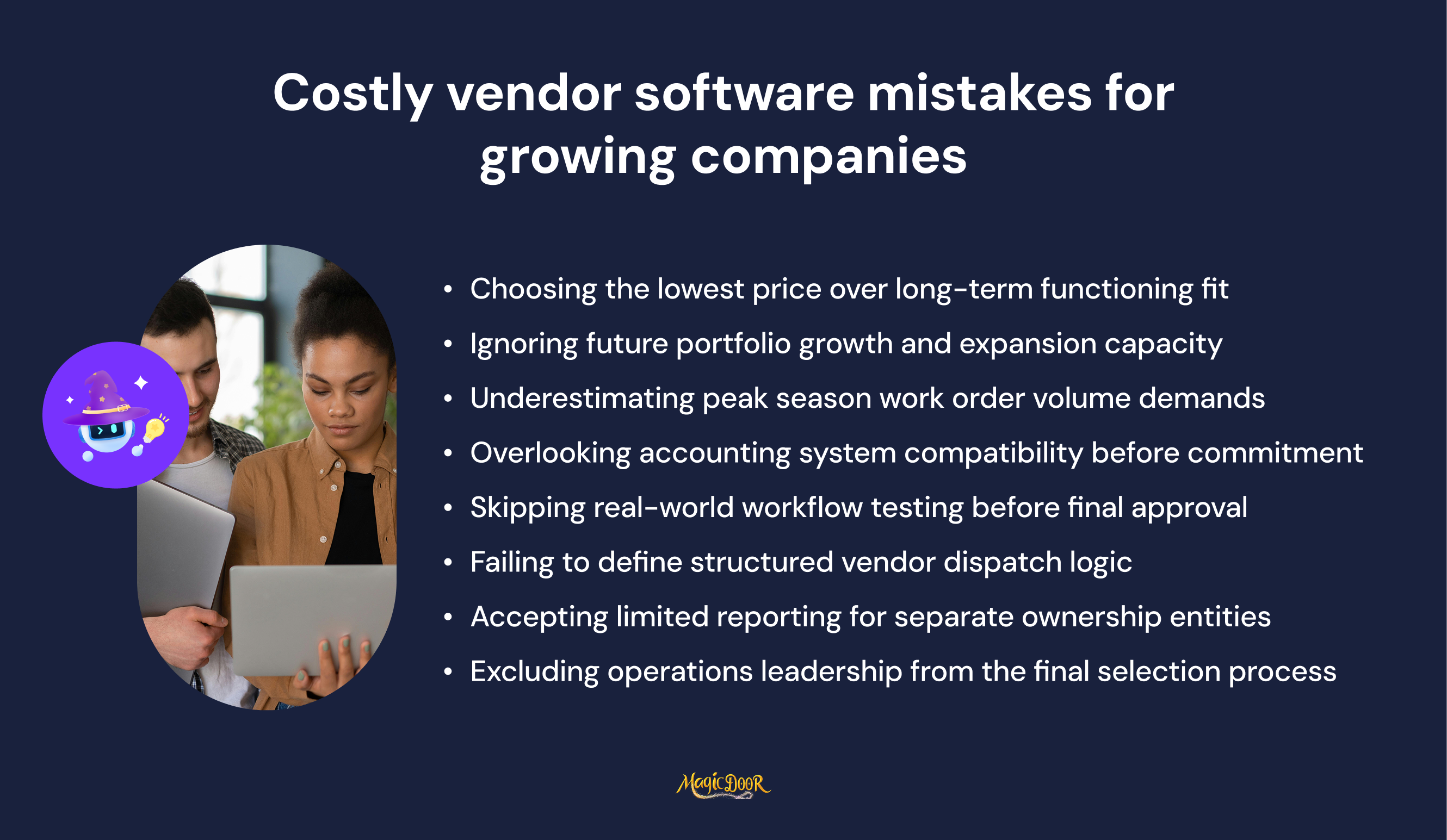
As property management companies expand, vendor coordination becomes more complex.
The wrong vendor management system does not fail immediately, it creates small inefficiencies that compound over time.
One common mistake is choosing software that only handles basic contact storage. Vendor management requires compliance tracking, contract documentation, performance monitoring, and structured approval workflows. Without automated insurance and license tracking, companies expose themselves to unnecessary risk and liability disputes.
Another error is ignoring integration. If vendor invoices cannot connect to maintenance records and accounting systems, teams end up reconciling payments manually. That increases the chance of duplicate payments and weakens financial oversight.
Many growing firms also underestimate scalability. A system that works for 20 vendors may struggle with 200. Without centralized vendor profiles and searchable documentation histories, oversight declines as volume increases.
Overlooking usability is another costly mistake. If staff and vendors avoid the platform because it is difficult to navigate, adoption drops, and processes revert to email and spreadsheets.
Finally, focusing only on subscription price can distort the decision. The real evaluation should includethe total cost of ownership, data security standards, reporting depth, and the ability to support long-term growth. A slightly higher upfront investment often reduces administrative workload, strengthens governance, and protects property value over time.
How to Compare Vendor Management Software Options With a Scorecard
When multiple vendor management software options appear similar, a structured scorecard forces objective comparison. Instead of relying on demos or sales claims, property managers can assign weighted scores to the capabilities that directly affect compliance, cost control, and long-term scalability.
Start by identifying evaluation categories tied to real performance: vendor compliance tracking, workflow automation, integration with property management software and accounting systems, reporting depth, usability, and total cost of ownership.
Each category should reflect how well the system supports governance, reduces manual workload, and protects against risk.
For example, automated tracking of vendor insurance, licenses, and tax documents reduces the risk of compliance violations. Integration with maintenance and accounting tools improves productivity and prevents disconnected data. Strong reporting delivers actionable insights into vendor performance, response times, cost variances, and documentation history.
A scorecard also reveals hidden weaknesses.
A low-cost platform with weak automation or limited integration may increase administrative time and risk over time. Evaluating usability, training resources, data security standards, and scalability ensures the system supports portfolio growth without forcing process changes.
Below is a useful scorecard template for property managers to compare vendor management systems side by side.
| Evaluation Category | What to Look For | Weight (1–5) | Software A | Software B | Software C |
|---|---|---|---|---|---|
| Vendor Compliance Tracking | Automated insurance, license, and W-9 monitoring with alerts | 5 | |||
| Workflow Automation | Automated approvals for work orders, invoices, and vendor onboarding | 5 | |||
| Integration Capabilities | Sync with maintenance systems, ERP, and accounting tools | 5 | |||
| Vendor Performance Metrics | Response time, completion speed, cost tracking, quality scoring | 4 | |||
| Centralized Vendor Profiles | Searchable contracts, documentation history, approval records | 4 | |||
| Data Security Standards | Encryption, backups, controlled access permissions | 4 | |||
| Usability & Adoption | Intuitive interface, mobile access, minimal training required | 4 | |||
| Reporting & Insights | Spend analysis, compliance status, risk visibility | 4 | |||
| Scalability | Supports growing vendor networks and higher work order volume | 5 | |||
| Total Cost of Ownership | Subscription, setup, migration, and long-term value | 5 |
Using a weighted scorecard transforms the selection process from subjective preference to measurable comparison. It highlights which vendor management system truly improves accountability, reduces administrative strain, strengthens compliance management, and supports sustained portfolio growth.
Why MagicDoor is the Best Option for Property Managers Looking for Vendor Management Software
MagicDoor connects vendor management directly with maintenance and accounting workflows.
Instead of relying on separate tools, property managers manage vendors within the same system used for leases, rent tracking, and financial reporting.
MagicDoor's vendor management features include:
- Vendor activity is linked directly to maintenance work orders
- Real-time repair status tracking from request to completion
- Vendor invoices connected to approved jobs
- Integrated accounting with contractor 1099 generation
- Profit and loss reporting connected to vendor payments
- Lease management and maintenance data stored in one system
- Reduced manual reconciliation between systems
- Structured documentation supporting audit and dispute review
- Scalable platform for growing property portfolios
By keeping vendor coordination, maintenance tracking, and accounting connected, MagicDoor helps property managers maintain compliance, improve accountability, and reduce administrative workload without adding another standalone system.
Conclusion
Selecting vendor management software is not just a technology decision; it determines how efficiently your properties operate.
The right system strengthens accountability, tracks vendor performance metrics, automates compliance verification, and maintains a complete documentation history for audits and dispute resolution.
When vendor onboarding, work order tracking, invoice approvals, and financial reporting operate within a single connected platform, property managers gain clearer oversight and stronger cost control. Automation reduces manual errors, supports regulatory compliance, and protects property value over time.
If you’re ready to centralize vendor coordination, simplify maintenance workflows, and align vendor payments with your accounting records, explore how MagicDoor can support your next stage of portfolio growth.