
Best Website Builders for Property Management Companies
Get expert property management insights, straight to your inbox.
A generic website won’t cut it in property management, not when listings need to update automatically, tenants expect to pay rent online, and property owners want to view real-time updates from anywhere.
The best property management website builders solve these needs in one place.
Some are built directly into property management software platforms. Others are more flexible tools that can be customized with the right plugins, templates, and content blocks.
In this guide, we’ll compare the top 10 options in 2026m including MagicDoor (spoiler: it’s more than just a site builder 😉).
You'll learn what features matter, how to choose based on your business model, and which tools help you launch an SEO optimized, mobile-responsive website without wasting time or budget.
What Makes a Good Property Management Website Builder?
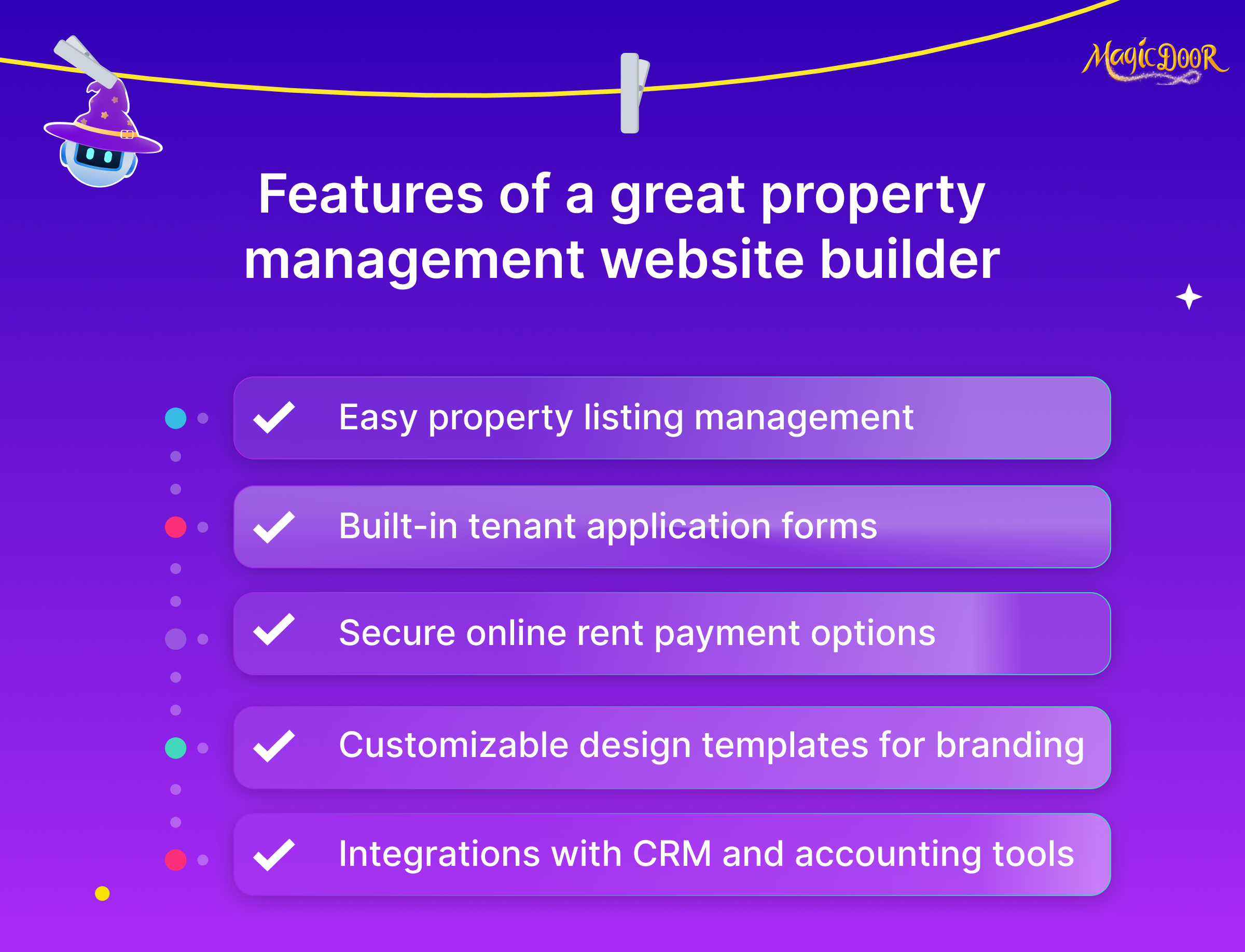
A solid website builder can give property management companies a serious edge, but only if it includes the right features.
Here's what to look for when evaluating your options:
- Mobile-friendly design: Responsive websites are a must for on-the-go tenants and property owners.
- Custom branding & templates: Build a professional site that reflects your company’s identity with customizable templates and logos.
- SEO features for local ranking: Search engine optimization tools help property managers rank higher in Google for local property searches.
- Rental listing integrations: Showcase available units with built-in property listings and filtering options.
- Tenant & owner portals: Offer secure logins for property owners and tenants to manage their accounts, view documents, or submit maintenance requests.
- Online rent payment support: Make rent collection easy by allowing tenants to pay online.
- Contact & application forms: Convert prospective tenants with custom lead generation and online application forms.
- CRM or lead capture tools: Route leads from your website into your pipeline with built-in or integrated CRM tools.
- Easy-to-use CMS or drag-and-drop editor: Update your property management website quickly, no dev needed.
These features aren’t just "nice to have", they’re what serious property management companies rely on to attract potential tenants, support current ones, and keep operations running efficiently.
If you're comparing builders, focus on how easy it is to:
- Add or remove property listings
- Customize content and branding
- Set up automated rent collection
- Enable self-service options for tenants and owners
Remember, a good website builder supports your property management business, not just your online presence. It should help convert site visitors into new tenants or property owners looking for professional property management services.
And if it integrates directly with your property management software, that’s even better.
Top 10 Website Builders for Property Management Companies
1. MagicDoor
MagicDoor is more than just property management software, it includes a built-in website builder made specifically for property managers. Different from general-purpose builders, it focuses on what this industry actually needs: listing automation, portals, payments, and lead generation, all in one place.
🔧 Website features for property managers:
- Advanced AI for property listing writing
- Mobile-responsive websites with custom branding
- Template customization made for the property management industry
- Built-in tenant portal integration, online rent payment, and maintenance request form
- Easy-to-add lead capture forms, contact forms, and a real-time property showcase
✅ Pros
- Designed specifically for property management use cases
- Reduces setup time with listing automation
- Fully connected to the platform, no third-party workarounds
⚠️ Cons
- Fewer design options than large website-only builders
- Not ideal for large real estate firms needing IDX depth
👤 Best for: Property managers who want a connected, easy-to-manage website that supports both marketing and operations, without changing platforms.
💰 Pricing: $2,50 per user per month. The website builder is included in the plan. No extra cost for using the builder, even better.
2. AppFolio
AppFolio is a full-featured property management software platform with a website builder baked in. It’s ideal for mid-sized to large companies that want everything in one system.
- Offers mobile-responsive websites with template customization
- Sites integrate with AppFolio’s core tools: online rent payment, tenant portals, and property showcase
- No standalone design freedom, but reliable for operations
- Great for real estate professionals who prefer convenience over pixel-perfect control
Pros: All-in-one convenience
Cons: Limited design flexibility
3. Buildium
Buildium gives you a basic but functional property management website template with your account, enough to get online and stay connected with tenants.
- Supports custom branding, contact forms, and lead capture forms
- Includes website hosting and direct links to maintenance request forms
- Ideal for managers who want minimal setup with operational tools baked in
Pros: Quick to launch
Cons: Less visually flexible than some competitors
4. TenantCloud
TenantCloud offers one of the more user-friendly website tools in the market, especially for smaller portfolios and DIY landlords.
- Built-in tools for property showcase, online rent payment, and tenant portal integration
- Includes a simple editor to create a custom website and accept applications
- It’s a solid option for basic marketing and lead intake
Pros: Easy to use, budget-friendly
Cons: Not built for complex portfolios or teams
5. Rentec Direct
Rentec Direct adds a real estate website to its software suite, focused on helping you list units and handle tenant inquiries.
- Sites come SEO optimized with IDX support (if needed)
- Basic template customization available
- Works well for small to medium-sized property management companies that need a public-facing site tied to listings
Pros: Fast listing updates
Cons: Limited modern design options
6. Propertyware
Propertyware focuses on single-family property management at scale, and includes a built-in website builder tailored to that segment.
- Offers property management website templates with custom branding
- Includes online rent payment, tenant portal integration, and maintenance tracking software form support
- Works well for large portfolios needing operational control over design freedom
Pros: Built for high-volume portfolios
Cons: Not ideal for smaller companies or those wanting more modern design
7. WordPress with Real Estate Plugins
WordPress isn’t a property management software, but with the right plugins, it can become a powerful website platform for property pros.
- Combine themes with plugins for property showcase, IDX support, and contact forms
- Allows full template customization and seo optimized setup
- Great for teams that want full control and don’t mind handling updates or hosting
Pros: Limitless flexibility
Cons: Requires more setup and technical know-how
8. Wix for Property Management
Wix offers drag-and-drop simplicity for building a custom website that looks modern, fast.
- Use real estate website templates and add features like lead capture forms and contact forms
- Easy to build pages for services, listings, and team info
- While not made just for managers, it works for lean property management teams
Pros: User-friendly with sleek design options
Cons: No built-in property management tools, everything must be added manually
9. Squarespace with Rental Templates
Squarespace shines when it comes to sleek, minimal design, and it's increasingly used by real estate professionals wanting to make a strong visual impression.
- Offers mobile-responsive websites with rental-focused templates
- Add contact forms, listing galleries, and custom branding
- Lacks native property management integrations but makes up for it in presentation
Pros: Beautiful designs out of the box
Cons: Not functionally built for property management
10. Upkeep Media
Upkeep Media is a marketing agency that offers done-for-you property management websites, great if you want someone else to handle the tech.
- Custom-built sites designed specifically for the property management industry
- SEO-first approach with seo optimized structure, content, and local targeting
- Also offers services like content marketing and lead gen
Pros: Full-service setup and marketing expertise
Cons: More expensive than DIY platforms
How to Choose the Right Website Builder for Your Property Management Business
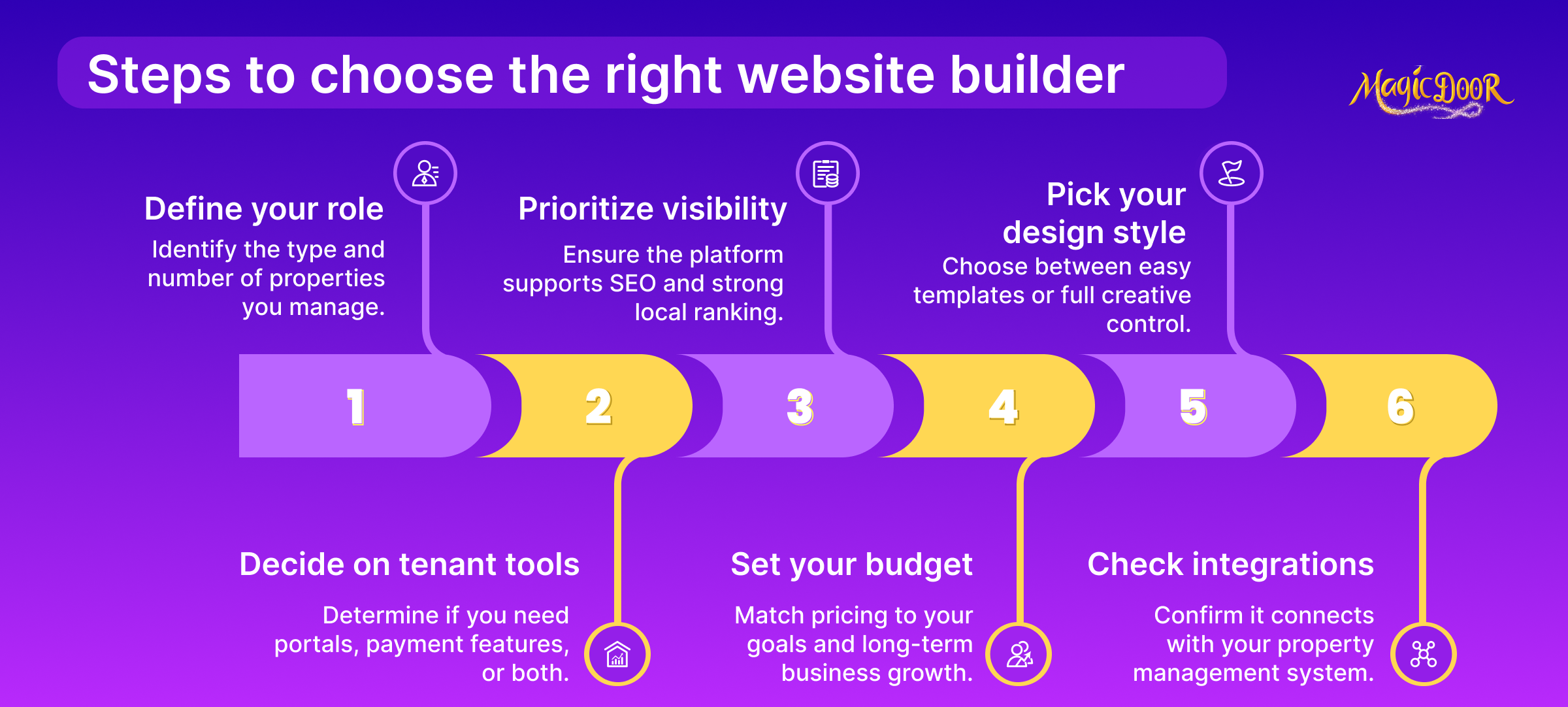
What Type of Property Manager Are You?
Not all property managers operate the same way, and your website builder should reflect that.
Ask yourself:
- Do you manage single-family homes, multifamily units, HOAs, or short-term rentals?
- Are you a solo operator with one property, or does your team specialize in handling portfolios for property owners?
- Is your site mostly informational, or do you rely on it to handle daily tasks like rent collection, maintenance tracking, or maintenance requests?
Your answers will help you narrow down what’s worth prioritizing.
For example:
- Smaller companies may benefit from free property management tools or simplified templates with contact forms and property showcase pages.
- Larger operations often prefer a builder that offers custom pages, lead generation tools, CRM integration, and automation features.
- Short-term rental managers might want fast page creation for available units and a clean booking flow.
If someone handed you a generic real estate website template, would it fit how your day-to-day runs? If the answer is no, it’s worth looking for a builder made with property management in mind.
Even simple things like scheduling a tour, collecting leads, or updating listings should feel effortless, not like you're working around limitations. That’s the difference between a template that just looks nice and one that helps you run your business more smoothly.
Do You Need Built-In Tenant Portals or Payment Tools?
If you're offering property management services, your website should do more than just look professional, it should function like a digital office.
Here’s what to consider:
✅ Tenant portal integration
- Allows tenants to log in securely, view lease details, and submit maintenance requests
- Cuts down on back-and-forth emails and missed updates
✅ Online rent payment
- Helps with on-time rent collection
- Offers a better experience for tenants who prefer digital options
- Connects with your property management software for easier accounting
✅ Owner access
- Some platforms also support owner dashboards, so your clients can view performance data or important updates
✅ Form functionality
- Contact forms and online applications make it easy for prospective tenants to reach out or apply, without calling your office
- Custom forms also support lead capture and routing into your CRM
A property manager we spoke to recently shared how they used to spend hours manually processing rent payments and maintenance requests via email. After switching to a builder with integrated tenant tools, those tasks now take minutes, and the volume of tenant complaints about slow responses dropped almost immediately.
Websites that include these features don’t just make your business look more professional.
They help reduce admin time, improve tenant satisfaction, and make your daily work more manageable, whether you're running one site or managing dozens of properties.
How Important is SEO and Local Ranking?
A property management website that doesn’t show up in Google search might as well not exist. SEO (search engine optimization) isn't just for real estate giants, it's a significant growth lever for local property managers, too.
Think about how most potential clients start their search:
They type “property manager near me” or “rental properties in [city]” into Google, looking for someone who feels local and reliable. If your site isn’t optimized for those kinds of searches, your competitors will win that traffic.
That’s where SEO-friendly website builders come in. Look for tools that offer:
- Custom domain setup for a more trustworthy URL
- SEO page settings like meta descriptions, slugs, and header tags
- Built-in performance features to help with search engine indexing
- Mobile-responsive websites that rank better and improve on-page time
- Local schema markup support (or an easy way to add it)
For property management companies, local SEO isn’t optional. It helps get your listings in front of the right audience, nearby renters and owners searching for services in real time.
One small team shared that after switching to a builder with basic SEO features, they started ranking for "[city] rental management" within a few months, and lead volume nearly doubled.
Even if you're not running paid ads, SEO brings steady traffic. And traffic brings inquiries.
What’s Your Budget?
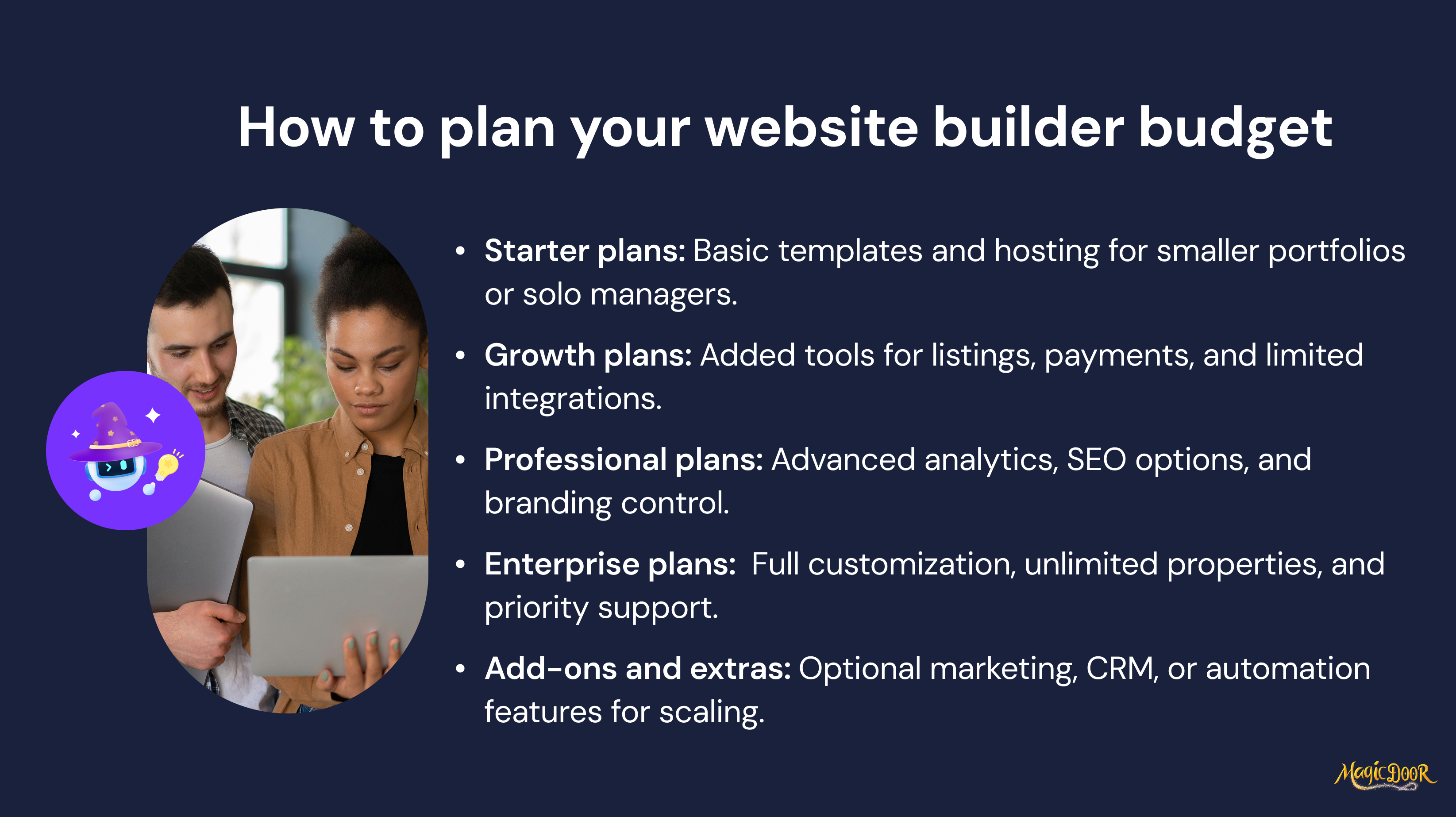
Some website builders charge $10/month. Others run into the thousands per year, depending on features, hosting, and support.
When evaluating pricing, be realistic about what you're getting, and what you’ll need to pay for separately.
Here’s a quick breakdown of cost factors:
- Annual plans vs. monthly billing
- Does it include website hosting, or is that extra?
- Can you use your custom domain?
- Are tenant portal integration, online rent payment, or CRM features included?
- Are there limits on the number of properties or pages you can publish?
- Will you need developer help, or can you use the built-in content management system?
Some platforms advertise a low starting price, but charge extra for basic tools like lead capture forms, contact forms, or listing pages. Others are true all in one solutions, what you see is what you get.
One company we spoke to started with a free plan on a general builder, thinking it would save money. But by the time they added plugins for listings, payment tools, and security, their costs exceeded what they would’ve paid for dedicated property management software with built-in website tools.
Budgeting for your site isn’t just about the sticker price.
Consider time, third-party costs, and whether your team can manage the site with just a few clicks, or if it will turn into another long-term task that never gets done.
Do You Want a Drag-and-Drop Editor or Full Customization?
The answer here depends on how your team works, and how hands-on you want to be.
A drag-and-drop editor makes it easy to create a clean, eye-catching site in just a few clicks. Most come with built-in blocks for contact forms, property showcases, or lead forms. It’s a popular option for property managers who don’t want to touch code but still need to update listings, add pages, or change visuals quickly.
On the other hand, full customization offers more flexibility, things like custom layouts, integrations, and advanced features for teams with dev support or specific design needs. This route works best for companies with a bigger scope or brand guidelines that can’t fit into a standard property management website template.
Here’s a real-world example: one property management company in Arizona wanted a custom website that looked different from its competitors.
They hired a designer, but later ran into issues updating content and listings because their site lacked a proper CMS. After switching to a platform that balanced customization and ease of use, their site became something the whole team could actually manage, not just the developer.
Make sure the platform offers template customization, access to code (if needed), and a solid content management system. That way, you're not locked into a look or relying on someone else to make small changes.
Does It Integrate with Your Property Management Software?
Integration isn’t a bonus. It’s a necessity if you want your website to support your business, not just promote it.
Look for builders that connect directly to your property management software, or at least support integrations for key tasks like:
- Tenant portal integration
- Online rent payment
- Embedded maintenance request forms
- Lead capture forms that send straight to your CRM
- Automatic syncing of property showcase listings
- Support for IDX, if your site also needs to handle real estate traffic
When your tools work together, you can reduce duplicate data entry, respond to potential clients faster, and keep your operations tighter.
One property manager told us they used to manually copy application data from their site into their back-office system, until they switched to a platform with built-in sync. That one change saved hours every week.
If your site doesn’t connect to your daily tools, it becomes one more thing to maintain.
A platform that integrates with your existing systems, or offers all-in-one solutions, helps you focus on what you’re there to do: manage properties, support tenants, and grow your company.
Can I Use My Property Management Software as a Website Builder?
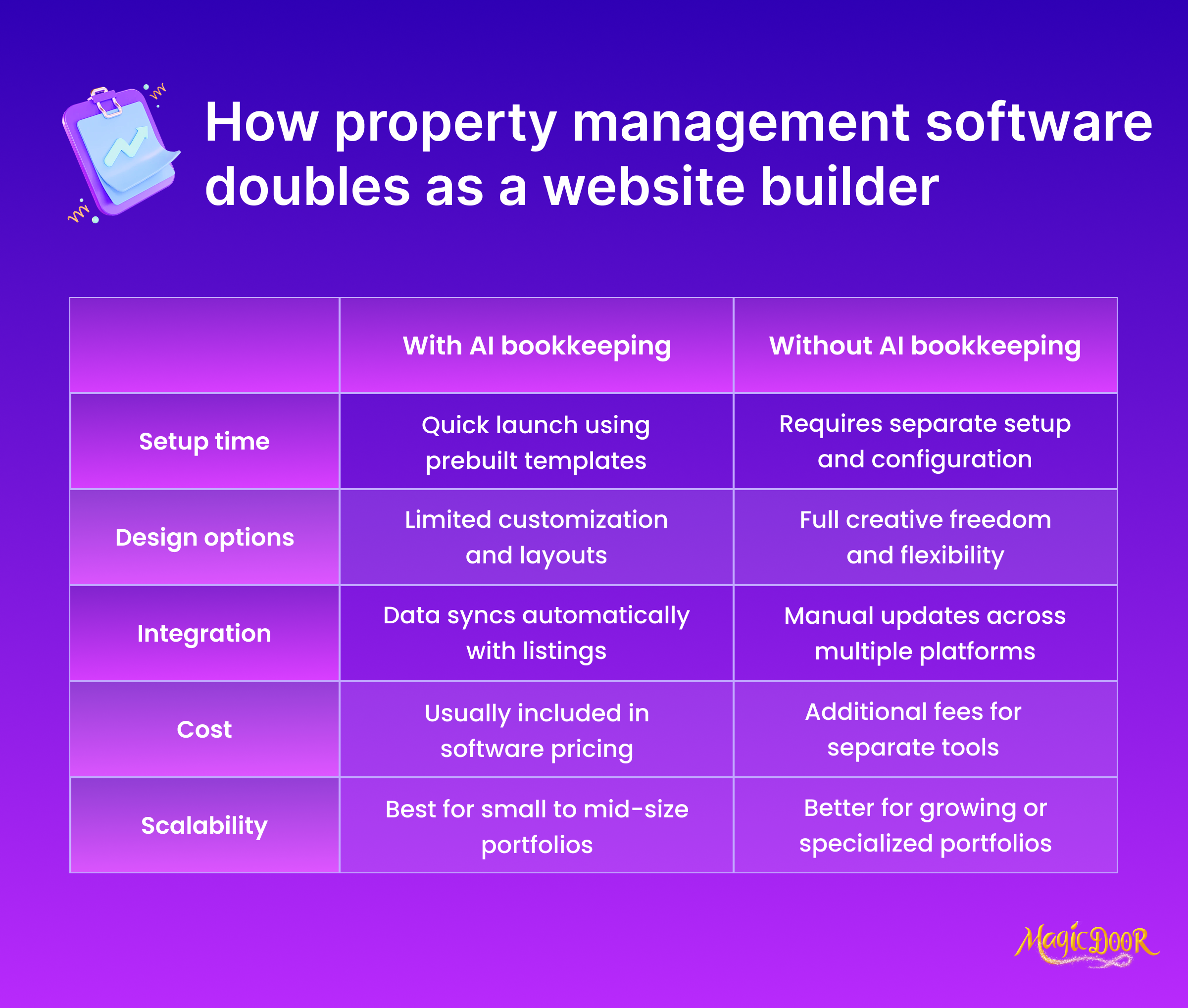
Some property management software platforms now offer built-in tools to help you create a working property management website without needing a separate builder.
It sounds convenient. And for many companies, it is. But there are trade-offs.
Here's what to consider:
✅ Pros of using your software as a website builder:
- Built-in tenant portal integration, online rent payment, and maintenance request forms
- Centralized control of your business tools and website from one dashboard
- Pre-designed templates made for the property management industry
- Listings pulled directly from your database to create a real-time property showcase
- Easier setup, specifically for teams that want to go live quickly
Some platforms even offer custom branding, template customization, and mobile-responsive websites, which makes your site look polished without hiring a designer. These setups can work well for smaller companies or operators who want something simple, clean, and functional.
But there are limitations, too.
Many of these built-in sites use a rigid property management website template, and customizing beyond what’s included isn’t always possible. You might find it harder to add pages, adjust layout elements, or insert custom features like lead capture forms, IDX support, or advanced SEO optimization.
And when you're competing with other property management companies who invest in a full-featured real estate website, that can put you at a disadvantage, mainly in local search rankings.
Using your property management software to build your site can work, as long as you're aware of the trade-offs. It’s ideal for speed, function, and operational features. But if design freedom, SEO, or marketing control matter to your company, a standalone website builder might offer more room to grow.
Why MagicDoor is the Website Builder You Didn’t Know You Needed
Most property management software tools aren’t known for their website capabilities, but MagicDoor breaks that trend completely.
Our built-in website builder isn’t a side feature or a last-minute add-on. It’s designed specifically for property managers who want a professional, functional, and seo optimized website, without needing to wrangle WordPress, plugins, or third-party tools.
Here’s what you can do with MagicDoor’s website builder:
- Launch a mobile-responsive website with modern, eye catching design
- Use custom branding and select from flexible templates that fit your business
- Add a property showcase section that updates automatically
- Accept online rent payments, enable tenant portal integration, and collect leads, all from the same dashboard
- Include smart contact forms, IDX support (for hybrid real estate professionals), and even maintenance request forms
🎤 And now for the mic-drop moment: 98% of property listings on MagicDoor-powered sites are written automatically by our AI.
You don’t need to write long descriptions or spend hours formatting listing pages. Just input the basic info, and the system generates listing copy that’s clean, informative, and ready to publish.
If you’ve ever tried to create a new property management website template using a general-purpose builder, you know how much time it takes to make it functional.
With MagicDoor, you can launch a branded, seo optimized, fully-featured site in less time than it takes to answer your inbox on a Monday morning. 😉
Conclusion
Your website isn’t just a digital brochure, it’s how you attract new owners, fill vacancies, and deliver a better experience for your existing tenants.
Whether you're starting from scratch or upgrading an outdated real estate website, the builders in this list offer a solid mix of design flexibility, built-in management features, and automation options. And if you’re already using property management software, choosing a builder that connects directly to your system (like MagicDoor) keeps everything under one roof.
Pick the builder that matches your team’s workflow, your portfolio needs, and your long-term growth goals. A smarter property management website isn’t just easier to run, it works harder for your business.